Troubleshooting & FAQ
- First, three quick checks
- The Setup status card
- The plugin fails to build
- Steam does nothing / every node says “Unavailable”
- Achievements or stats do not save
- It works in the editor but not in my packaged game
- The Steam overlay does not show
- Sessions: searching finds nothing
- Steam.Error.* codes
- Asking for help
First, three quick checks
Most problems are one of these:
- Is the Steam client running and logged in? It must be, every time you test.
- Are you using Play > Standalone Game? Steam does not run in Play In Editor. Nodes report Unavailable there. This is normal.
- Is the Dashboard green? Open the Steam Dashboard (Tools > Steam Dashboard, or the Steam button in the toolbar), click Re-check and look at the Setup status card.
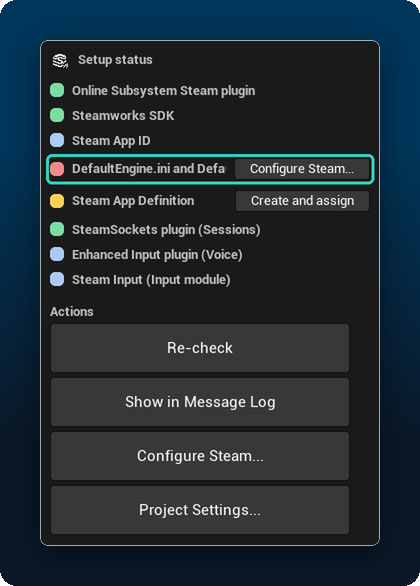
The Setup status card
| Row | What it means | What to do |
|---|---|---|
| Online Subsystem Steam plugin | The engine’s Steam plugin is missing or disabled | Enable Online Subsystem Steam in Edit > Plugins, restart |
| Steamworks SDK | The plugin was built without Steamworks (unsupported platform or build) | Use Windows, or see the plugin fails to build |
| Steam App ID | It is 0 (error) or 480 (info: you are using the test app) | Set it in Project Settings > Plugins > Sandwich Steam |
| DefaultEngine.ini | Steam lines are missing or wrong | Click Fix / Configure Steam… |
| Steam App Definition | None assigned, cannot load, has invalid data, or is not in the cook | Click Create and assign / Add to cook. Hover the row for the exact problem |
Show in Message Log in the Actions card lists the same checks with details.
The plugin fails to build
- “Missing Modules” dialog, then an error about a compiler or Windows SDK. Install the Visual Studio workload from Installation, Step 0, then reopen the project.
- The plugin is not found at all. Check the folder layout:
Plugins/SandwichSteam/SandwichSteam.uplugin. A folder inside a folder is the usual reason. - The plugin was built for a different engine version. Delete the plugin’s
BinariesandIntermediatefolders and your project’s, then reopen. Sandwich Steam supports UE 5.6, 5.7 and 5.8. - Still failing? Open an issue and paste the first error line from the build log (in Unreal: Tools > Output Log, or the Visual Studio Output window).
Steam does nothing / every node says “Unavailable”
| Situation | Why | Fix |
|---|---|---|
| You pressed the normal Play button | Steam does not run in Play In Editor | Use Play > Standalone Game |
| Steam client is closed | The plugin needs the running client | Start Steam and log in |
| Steam closes while the game runs | Unreal’s Steam integration ends the game when Steam quits | Keep Steam running |
| Steam does not know which game this is | Normally Unreal writes steam_appid.txt itself (Standalone, Development builds) | Run Configure Steam… first; if it persists: Dashboard > Advanced > steam_appid.txt > Create |
| Project not configured | DefaultEngine.ini lacks the Steam lines | Dashboard > Configure Steam… |
Run Steam.Core.Dump in the game console. It tells you which of these is the reason.
If you need the file anyway, the dashboard’s Advanced page creates it next to the editor (Engine Binaries) or your project’s executable (Project Binaries). It is for development only; the Publish Tool always leaves it out of the upload.

Achievements or stats do not save
- Run
Steam.Stats.Dump. It must say the stats are ready. Writes made before that are queued and applied automatically. - Stat uploads are batched: after a change, the plugin waits a few seconds (default 5) before sending. Unlocking an achievement sends immediately.
- Make sure the name or tag exists on Steam for your App ID. A wrong name fails with
Steam.Error.InvalidArgumentorSteam.Error.Failedand logs one warning. - Do not use Unreal’s own Online Subsystem achievement nodes for the same achievements at the same time.
It works in the editor but not in my packaged game
- Package as Development first. Then run
Steam.Stats.Dump. If it says the App Definition was not found, open the dashboard and click Add to cook on the Steam App Definition row. - Put
steam_appid.txtnext to the packaged.exefor testing only, and remove it before releasing on Steam. - A Shipping build gets Steam only when it is started from Steam (the Play button, after uploading it to a branch). Double-clicking the Shipping
.exeruns the game without Steam: multiplayer shows “Local network” and the overlay does not open. Shipping writes no log, so nothing tells you. To test outside Steam, use a Development build.
The Steam overlay does not show
- Start the game as Standalone Game (not PIE) or as a packaged build.
- In Steam: Settings > In Game > Enable the Steam Overlay while in-game must be on.
- Some drivers and screen recorders conflict with the overlay. Close them to test.
Sessions: searching finds nothing
On the shared test app Spacewar (480), Steam returns other developers’ lobbies and the plugin correctly rejects them, so the list is empty. Test with two accounts on your own App ID, or narrow the search with a Profile Tag.
Steam.Error.* codes
Failed calls return a result with one of these tags:
| Tag | Meaning |
|---|---|
Steam.Error.Unavailable | Steam is not running, or not available in this mode (for example PIE) |
Steam.Error.NotInitialized | Steam is running but not ready yet, for example stats still loading |
Steam.Error.NotLoggedIn | Steam client is not logged in |
Steam.Error.FeatureDisabled | The feature is switched off in Project Settings > Plugins > Sandwich Steam |
Steam.Error.NotSupported | Not possible on this platform or setup |
Steam.Error.InvalidArgument | Bad name, tag or value (unknown achievement, wrong stat type…) |
Steam.Error.Timeout | Steam did not answer in time |
Steam.Error.Failed | Steam refused the request. Check the Output Log |
Steam.Error.Cancelled | The request was cancelled |
Steam.Error.RateLimited | Too many requests. Slow down |
Steam.Error.Offline | Steam is in offline mode |
Steam.Error.QuotaExceeded | For example Steam Cloud is full |
Steam.Error.NotOwner | Only the host / owner may do this |
Steam.Error.WrongScope | Client-only feature used on a server, or the other way round |
Asking for help
Open an issue and include:
- Unreal Engine version and operating system
- Output of
Steam.Core.Dumpfrom a Standalone game - Output Log lines from the
LogSandwichSteamcategory (turn on Verbose Logging in Project Settings > Plugins > Sandwich Steam for more detail)